Usage
Start with Choose a workflow for diagrams comparing extraction and cleanup with picture inventory, move and copy, including the options for each stage and the difference between cleanup artifacts and picture metadata.
For a local model/client integration, see read-only MCP. Its
inventory and prepare_transfer tools return bounded structured pages without
writing reports or applying a plan. The CLI examples below retain their existing
dry-run, report and human-approval behavior.
Image inventory
archivist --list-pictures --parent-folder "C:\photos" --filter JPG,Png,Jpeg,ARW
archivist --list-images --extract-zip --parent-folder "C:\photos" --dry-run
pictures and images are aliases. Listing scans ordinary files and ZIP entries,
including ZIPs inside ZIPs, without extracting files. An image is classified by its
extension, not its contents. The built-in catalog is:
jpg jpeg png gif bmp tif tiff webp heic heif avif ico svg
arw cr2 cr3 nef nrw dng orf rw2 raf pef srw
--filter restricts that catalog. It accepts commas, case differences, surrounding
whitespace and leading dots, and removes duplicates. Empty entries and unsupported
extensions are errors, not wildcards or a fallback to all images.
Inventory rows contain the filename, normalized extension, full source location,
ordering timestamp and timestamp provenance. ZIP locations have the form
C:\photos\outer.zip :: inner.zip :: album/photo.jpg; those are archive members,
not claims that extracted files already exist. Counts distinguish on-disk images,
archived images, direct entries in each archive, and physical source folders.
Existing disk and archive copies count as separate occurrences; there is no
content deduplication.
Runs append separated sections to <parent-folder>\pictures.log and print its
absolute path. --log-file selects a different report and --no-log-file disables
it. Image workflows do not also create report.log. JSON rows escape filenames
and paths. Known AppleDouble/@eaDir metadata and filesystem links are excluded.
The report contains local paths: redact it before sharing publicly.
Move and copy pictures
# Listing, move preview and copy preview share the same inventory
archivist --move-pictures --parent-folder "C:\photos" --dry-run
archivist --move-pictures --copy --parent-folder "C:\photos" --dry-run

# Apply: list -> human approval -> complete ZIP extraction -> move
archivist --move-pictures --parent-folder "C:\photos" --destination "D:\collected" --apply

# Copy instead: leave original pictures and ZIPs unchanged
archivist --move-pictures --copy --parent-folder "C:\photos" --destination "D:\collected" --apply
Listing and extraction prerequisites are added once, regardless of explicit flags or argument order. The filter selects pictures, not which other archive files are extracted. No matching pictures means no extraction, destination creation or ZIP deletion. Explicit image workflows never run metadata cleanup.
Before anything changes, the console lists counts, extension breakdown, physical
source-folder impact, mode, exact destination names, extraction locations and ZIP
disposal effects. Only y or yes approves. Blank input, EOF, refusal or no
interactive terminal prevents mutation. --apply and environment settings cannot
replace approval; --dry-run wins over ARCHIVIST_APPLY=true.
Listing alone stays read-only with --apply. Listing combined with
--extract-zip --apply follows list -> approve -> extract, without transfers.
Explicit extraction alone skips standard cleanup, but still removes MACOSX
trees by default. Add --leave-macosx for extraction without any cleanup.
Destinations and collision names
The destination is flat. Relative destinations resolve against the process’s current working directory, not the parent folder. Applying a transfer requires one; preview does not. Neither source nor destination may contain the other. Links/junctions and existing extraction targets are rejected; image workflows never merge into an existing extraction folder.
Noncolliding pictures keep their names. Collisions are grouped case-insensitively,
and all incoming duplicates get numbered names, even when the bare name is free.
Existing files and incoming noncolliding names are reserved first. Available
suffixes are assigned oldest first, with at least three digits and no wrap after
999. For example, if photo.jpg and photo (001).jpg exist, the next two colliding
pictures receive photo (002).jpg and photo (003).jpg.
Ordering uses original creation/birth metadata where available, including ZIP NTFS or extended Unix creation fields. Otherwise it uses original modification time and labels that fallback in the report. Full source location breaks timestamp ties. Extraction time, image capture time and POSIX metadata-change time are not substitutes.
Photo metadata and original dates
Image workflows copy picture bytes without decoding or rewriting them. Embedded EXIF, including DateTimeOriginal (date taken), digitization dates and camera metadata, therefore remains unchanged. EXIF dates and filesystem dates are distinct: Archivist never replaces one with the other.
Original filesystem modification time and available creation/birth time are
captured during inventory, restored after writing, and verified before a move
source or original ZIP can be removed. The report includes creation_time_ns
and modification_time_ns as UTC epoch nanoseconds; null means creation time
was unavailable, not inferred from modification time or EXIF.
For ZIP entries, Archivist checks local and central timestamp metadata. NTFS timestamps preserve 100-nanosecond precision; extended Unix timestamps preserve UTC seconds, including local-header-only creation dates. NTFS metadata takes precedence over extended Unix metadata, then the ZIP’s DOS modification time is the fallback. DOS timestamps have two-second precision and no timezone, so they use the current local timezone. Missing archive creation dates cannot be recovered: the newly created file has an OS-assigned creation time, not an original one.
Windows has native creation-time restoration support. Linux may expose source
birth time without supporting its restoration, and some destination filesystems
round dates. A known creation/modification date that
cannot be preserved causes an explicit failure, not a silently changed date.
Original sources and not-yet-removed ZIPs are retained; earlier completed moves
are not undone. Use a destination/platform supporting the original timestamps.
Available access time is restored too, but subsequent reads and OS bookkeeping
can change it. POSIX ctime records metadata changes, not file creation, and is
not preserved. These guarantees apply to the image workflow; legacy extraction
alone retains its existing modification-time behavior.
Extraction, preservation and failure
All relevant physical ZIPs and their nested ZIPs are fully extracted before the
first picture transfer. In move mode, extraction publishes to unused folders
beside the original ZIPs. Nonselected contents remain there, including nested ZIP
files. Only original physical ZIPs selected from the source tree are eligible for
deletion, after every picture transfer succeeds. --leave-zip retains them;
--send-to-bin and --force affect ZIP disposal, not picture-source permissions.
Copy mode uses private temporary storage outside source and destination. It leaves
source paths, bytes and application-controlled metadata unchanged, apart from the
requested report; OS-managed access-time bookkeeping is excluded. --force and
--send-to-bin are rejected with copy mode.
Transfers create destination files exclusively, stream data, and preserve original dates before removing any move source. Changed sources or newly occupied targets stop execution rather than silently changing the approved scope. Interrupted/failed copies remove incomplete destination files where possible. Once a complete destination exists, an error during source removal retains that copy and reports it for manual reconciliation.
Any incomplete inventory, failed extraction, transfer, ZIP disposal or cleanup stops the new workflow with a nonzero exit. Completed operations are not rolled back. Previously published extraction folders or completed transfers may remain; not-yet-removed original ZIPs are retained. Inspect reported completed/remaining work and remaining folders before retrying. Listing is metadata-based: a damaged image payload may only be detected by CRC verification during full extraction.
Supported archive limits
Image workflows accept stored, deflate, bzip2 and LZMA ZIP members. Encrypted, unsupported, unsafe-path, duplicate/case-conflicting and link/special members make the inventory incomplete and block application.
Nested inspection allows ten archive levels including the outer ZIP, 100,000 aggregate entries, 64 MiB per nested ZIP payload and 256 MiB aggregate nested payload reads. Image payloads are not decompressed merely to list them. The existing expansion guard rejects archives above 1 GiB expanding more than 100 times. Extraction checks space for twice the unpacked tree plus the existing 100 MiB reserve, allowing publication when hardlinks are unavailable. These are safety limits, not a throughput guarantee or protection against every concurrent writer; do not modify a collection while processing it.
Legacy archive extraction and cleanup
Without explicit action flags, the existing workflow below remains unchanged.
Archivist checks the archive, available space, and expansion ratio.
It extracts into a hidden sibling staging folder.
It restores the original timestamps stored in the ZIP.
It renames the staging folder and removes the ZIP unless
--leave-zipis set.
A failed or interrupted extraction leaves the destination untouched. ZIP files found inside extracted content are processed in the same run, up to ten levels deep.
Metadata cleanup
After extraction, Archivist removes these items in order:
AppleDouble
._*files at or below the configured maximum size.DS_StorefilesWindows
Thumbs.dbanddesktop.inifiles._*folders without visible contentSynology
@eaDirfolders
Use the matching --leave-* option to preserve any category.
_MACOSX and the standard __MACOSX archive metadata folders are removed by
default in the extraction/cleanup workflow. This recursively removes matching folders below
the parent folder and all their contents, including visible files and nested
directories. Nested matching folders count once as part of the outer tree.
Other names and files named _MACOSX or __MACOSX are kept. Links and junctions
are not followed. This step runs last, also with --extract-zip, so it
includes folders created by extraction. Pass --leave-macosx or set
ARCHIVIST_REMOVE_MACOSX=false to preserve them. Image actions do not run this
default cleanup; explicitly enabling it with image actions is rejected.
# Preview first; add --apply to remove the folders
archivist --parent-folder "C:\photos"
archivist --parent-folder "C:\photos" --apply
# Opt out of MACOSX cleanup
archivist --parent-folder "C:\photos" --leave-macosx --apply
--remove-macosx explicitly enables removal even if the environment disables it;
--leave-macosx overrides an enabling environment value. --send-to-bin sends
each selected tree to the Recycle Bin or Trash instead of deleting it permanently.
Trees containing read-only items are kept unless --force is passed.
Existing folders
If an archive destination already exists, interactive runs ask whether to extract into it:
2024.zip: folder "2024" already exists. Extract into it and overwrite files with the same name? [y]es / [n]o / [a]ll / [s]kip all:
Extracting into an existing folder adds new files and replaces matching files. Other files remain
in place. Before anything moves, Archivist rejects links, junctions, file-versus-folder conflicts,
and read-only replacements unless --force is set.
Note
Dry runs and non-interactive runs do not prompt. Existing destinations are reported and skipped.
Dry runs
A run stays in preview mode until --apply is passed or ARCHIVIST_APPLY=true is set. The report
file is the only file written during a dry run, unless logging is disabled.
# Preview
archivist --parent-folder "C:\photos"

# Make the changes
archivist --parent-folder "C:\photos" --apply
Legacy reports
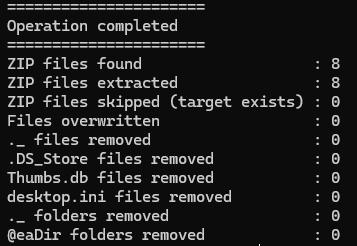
The console lists the active options, each action, and a count per step. The same report is appended
to report.log in the processed folder by default.
The settings are split into two tree-style groups. Current Config shows the parent folder, immediately followed by Mode, cleanup rules and report settings. Only with –apply lists the actions and removal policies; enabled actions include their execution mode so they cannot be mistaken for immediate deletions during a preview:
Current Config
|- Parent Folder     : C:\photos
|- Mode              : DRY-RUN (read-only)
|- AppleDouble Rules : ._ files <= 2048 bytes; ._ folders without visible files
|- Log to File       : <parent-folder>/report.log
|- Report File       : C:\photos\report.log

Only with --apply
|- Extract ZIPs                       : ENABLED (dry-run : read-only)
|- Delete ZIPs                        : ENABLED (dry-run : read-only)
|- Remove AppleDouble                 : ENABLED (dry-run : read-only)
|- Remove .DS_Store                   : ENABLED (dry-run : read-only)
|- Remove Thumbs.db                   : ENABLED (dry-run : read-only)
|- Remove desktop.ini                 : ENABLED (dry-run : read-only)
|- Remove @eaDir                      : ENABLED (dry-run : read-only)
|- Remove _MACOSX / __MACOSX          : ENABLED (dry-run : read-only)
|- Send to Bin                        : DISABLED
|- Force-Delete (including Read-Only) : DISABLED
With --apply, Mode becomes APPLY (write) and enabled actions display
ENABLED (apply : write). DISABLED means the action is not selected;
--extract-zip also disables the standard cleanup categories in this summary.
Read-only refers to the collection: the report file may still be written during
a dry run unless --no-log-file is set.
Force-Delete (including Read-Only) is the display name for the existing
--force-readonly-deletion / --force option. It allows eligible read-only
items to be removed; it does not select additional cleanup categories or bypass
archive safety checks. Force deletion and sending items to the bin appear at
the bottom of the apply-only group, not among current read-only settings.
Setting |
Report destination |
|---|---|
No option |
|
|
The specified file |
|
|
|
Console only |
Common recipes
# Send removed items to the Recycle Bin or Trash
archivist --parent-folder "C:\photos" --apply --send-to-bin

# Keep original archives
archivist --parent-folder "C:\photos" --apply --leave-zip

# Extract without metadata cleanup
archivist --parent-folder "C:\photos" --apply --extract-zip --leave-macosx

# Remove AppleDouble files up to 4 KB, including read-only files
archivist --parent-folder "C:\photos" --apply --max-size 4096 --force