Choose a workflow
Archivist has two workflows. Choose by what you want to achieve, not by whether your folder happens to contain pictures.
Your goal |
Action |
Workflow |
|---|---|---|
Unpack ZIPs and remove operating-system artifacts |
No explicit action flag |
Extraction and cleanup |
Unpack ZIPs without the usual cleanup |
|
Extraction and cleanup, extraction only |
Find pictures on disk and inside ZIPs |
|
Picture workflow, inventory only |
Inventory pictures, then extract relevant ZIPs without collecting pictures |
|
Picture workflow, approved extraction |
Collect pictures into one flat folder |
|
Picture workflow, move |
Collect copies and preserve originals |
|
Picture workflow, copy |
--list-pictures and --move-pictures are aliases for --list-images and
--move-images. Adding an image action selects the picture workflow: it does
not add picture processing to the default cleanup workflow.
Important
Both workflows start in preview mode. --apply enables changes; picture
extraction and transfers also require interactive approval. A preview may write
its report; use --no-log-file to disable that write.
1. Extract archives and clean folders
Use this workflow to unpack a folder tree in place, optionally removing the housekeeping files that operating systems leave behind.
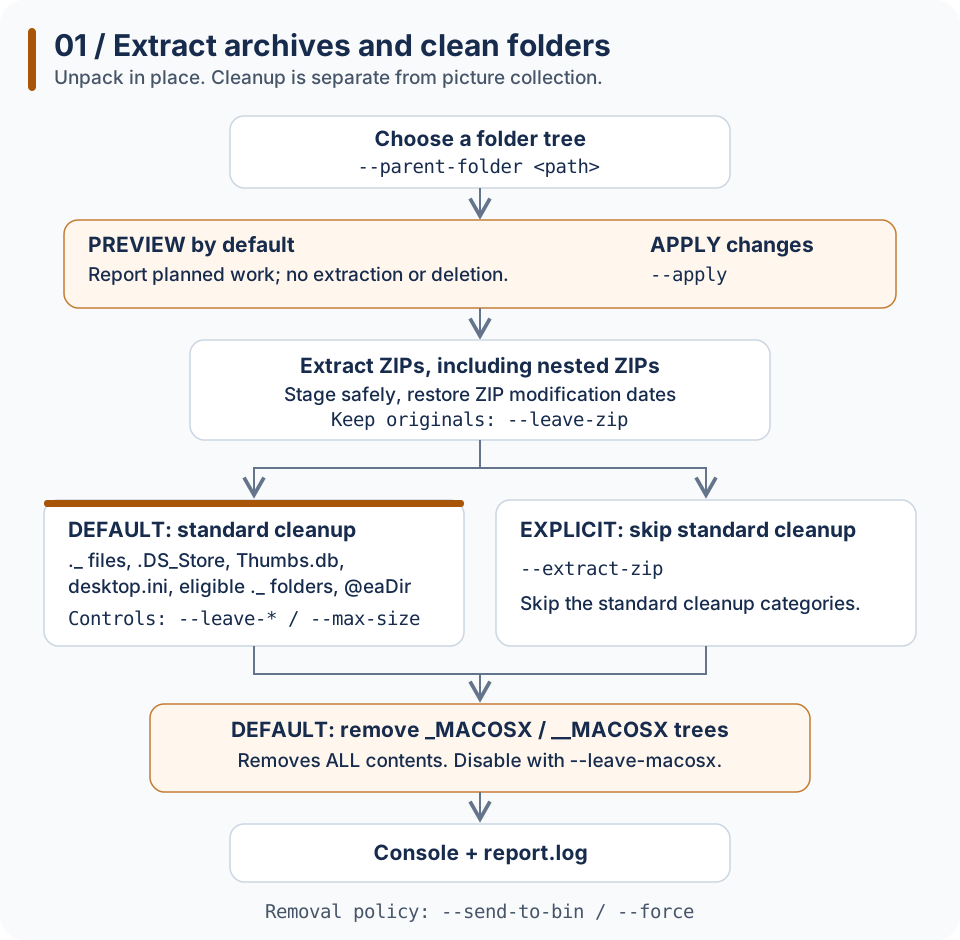
Extraction and cleanup. The branches show which steps your options enable; without apply, the workflow reports planned work instead of changing files.
Options along the path
Stage |
What happens |
Related options |
|---|---|---|
Select the tree |
Process descendants of the selected folder |
|
Preview or apply |
Report planned operations, or make changes |
|
Extract ZIPs |
Extract beside each ZIP; process nested ZIPs, up to ten levels; restore ZIP modification timestamps |
|
Standard cleanup |
Remove small AppleDouble files, |
|
Skip standard cleanup |
Select extraction without the standard cleanup steps |
|
Final cleanup |
Remove |
Enabled by default, also with |
Removal policy |
Delete permanently by default; protect read-only items unless forced |
|
Report |
Console plus |
|
Existing extraction destinations are skipped unless you approve merging in a terminal. Merging can overwrite matching files; dry runs and non-interactive runs do not approve merges. See existing-folder behavior.
# Preview extraction and the default cleanup
archivist --parent-folder "C:\photos"

# Apply, sending removed items to the Recycle Bin / Trash
archivist --parent-folder "C:\photos" --apply --send-to-bin

# Extract only; keep the original ZIPs
archivist --parent-folder "C:\photos" --extract-zip --leave-zip --leave-macosx --apply

# Extract and remove MACOSX trees, without the other cleanup categories
archivist --parent-folder "C:\photos" --extract-zip --apply
MACOSX removal is a default final cleanup step, not a cleanup-only mode: ZIP extraction still runs. It skips filesystem links/junctions, respects read-only protection, and counts a nested matching folder as part of its outer tree rather than counting it twice.
2. Inventory, move or copy pictures
Use this workflow to find pictures on disk and inside ZIPs, or collect them into one flat folder. The filename extension selects pictures; their bytes are not decoded or rewritten.
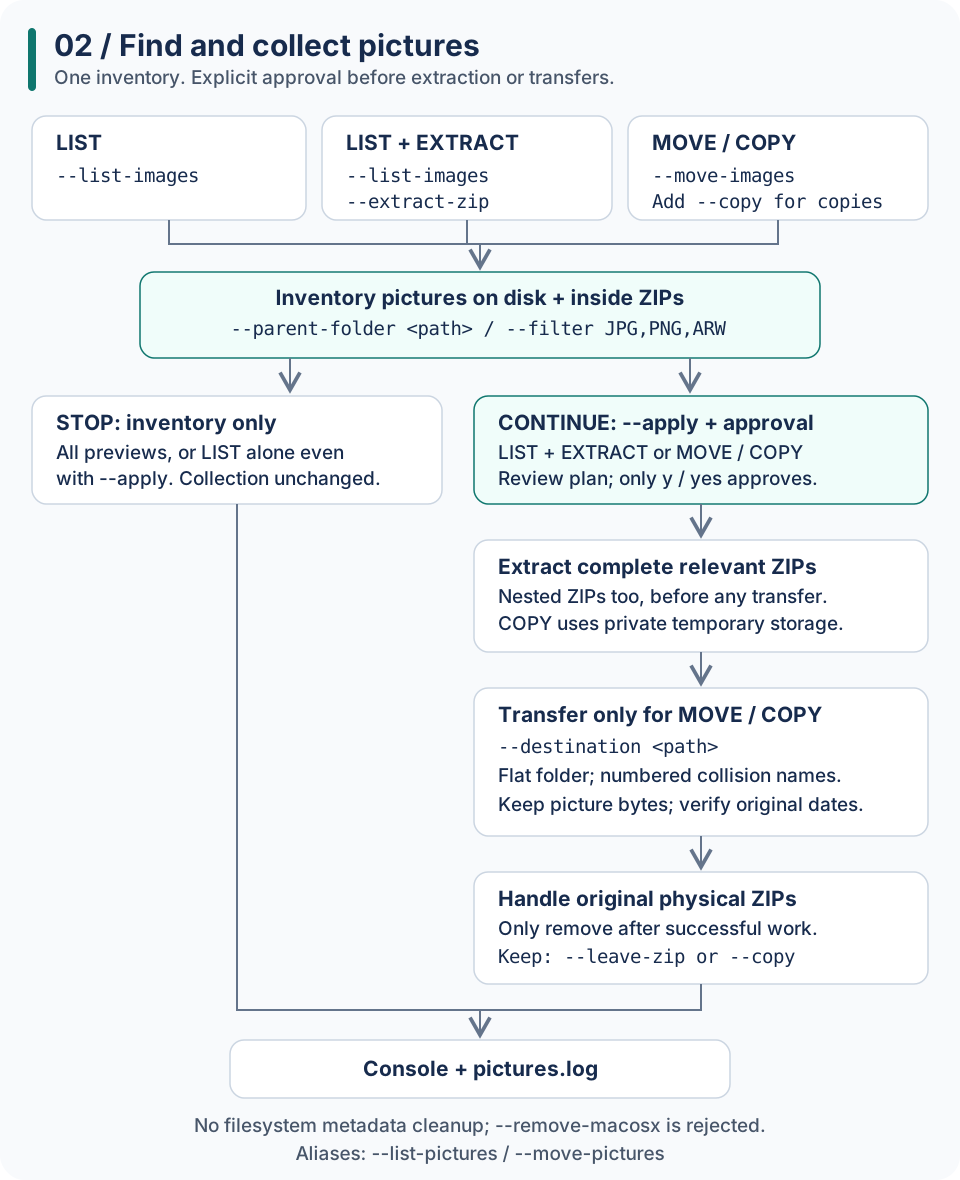
Picture actions share one inventory. Listing alone never changes the collection, even with apply; other applied actions must pass the approval gate.
Options along the path
Stage |
What happens |
Related options |
|---|---|---|
Inventory |
List pictures on disk and in ZIPs, including nested archives |
|
Select extensions |
Choose from the supported picture formats, including camera RAW formats |
|
Stop after listing |
No extraction, moves or copies, even with |
|
Preview |
Same inventory for list, move and copy; no destination required or created |
Omit |
Review and approve |
Review source impact, destination names, extraction locations and ZIP disposal; only |
|
Extract completely |
Fully extract relevant physical ZIPs and nested ZIPs before transfers; nonselected files are extracted too |
|
Move pictures |
Move selected pictures to a flat destination; nonselected extracted files stay in the source tree |
|
Copy instead |
Use temporary extraction storage; keep original pictures and ZIPs, without source-side extraction folders |
Add |
Handle collisions |
Never overwrite existing destination files; number colliding incoming names, oldest first |
Automatic; no extra option |
Dispose of original ZIPs |
For non-copy actions, remove selected original physical ZIPs only after extraction and any transfers succeed |
|
Report |
Console plus |
|
No matching pictures means no extraction, transfer, destination creation or ZIP deletion. Blank input, refusal, EOF or no interactive terminal prevents applied image mutations. A destination cannot overlap the source tree. Relative destinations resolve against the current working directory.
# Inventory pictures on disk and inside ZIPs
archivist --parent-folder "C:\photos" --list-pictures --filter JPG,PNG,ARW

# Preview a collection move; no destination is needed yet
archivist --parent-folder "C:\photos" --move-pictures

# Inventory, approve, then extract relevant ZIPs without moving pictures
archivist --parent-folder "C:\photos" --list-pictures --extract-zip --apply

# Inventory, approve, extract and move; keep original ZIPs
archivist --parent-folder "C:\photos" --move-pictures --destination "D:\collected" --leave-zip --apply

# Collect copies instead; original pictures and ZIPs remain
archivist --parent-folder "C:\photos" --move-pictures --copy --destination "D:\collected" --apply
Note
Image actions do not run filesystem metadata cleanup. --leave-* cleanup
switches and --max-size do not add cleanup to this workflow; --leave-zip
still controls ZIP retention. Default MACOSX cleanup does not apply here;
explicit --remove-macosx or ARCHIVIST_REMOVE_MACOSX=true is rejected with
image actions rather than silently ignored. Copy mode also rejects --force
and --send-to-bin because it preserves originals.
Metadata: remove artifacts, preserve picture information
These are different kinds of metadata:
Kind |
Examples |
Extraction and cleanup |
Picture workflow |
|---|---|---|---|
Operating-system artifacts |
|
Remove eligible items unless the category is disabled |
No cleanup; known AppleDouble and |
macOS archive metadata trees |
|
Remove whole trees by default; preserve with |
No cleanup; explicit |
Information embedded in picture bytes |
EXIF date taken, camera settings, GPS if present |
Cleanup does not strip embedded metadata from retained pictures |
Move/copy preserves picture bytes, including embedded metadata |
Filesystem dates |
Modification and available creation/birth time |
ZIP extraction retains its existing modification-time behavior |
Capture, restore and verify original dates before deleting sources |
Removing a metadata folder deletes everything inside it, including any real pictures you placed there. It is not an EXIF-stripping operation.
Picture creation times cannot be recovered when the source or ZIP does not contain them. If a known original creation/modification time cannot be preserved on the destination, the image workflow reports a failure rather than silently substituting another date. See photo metadata and original dates.